How to Connect ChatGPT to Your Finances (Without Handing Over Your Bank Password)
ChatGPT can now link to bank accounts, and the internet's reaction was roughly: “what could possibly go wrong?” Fair. Handing an AI your bank login (or broad access to your raw transaction feed) deserves that skepticism.
Here's the thing though: ChatGPT analyzing your actual numbers (your real balances, your real interest rates, your real spending) is dramatically more useful than ChatGPT guessing. The answer isn't to skip the connection. It's to connect the right way: through purpose-built tools you approve, with no way to move money and access you can revoke in one click.
That's what Zoninga does. Two minutes of setup, and ChatGPT can see your finances through 170+ purpose-built tools, and it can never touch your money. No bank password ever leaves your bank.
What this actually looks like
Once connected, you can ask ChatGPT things like:
- “How much did I spend on food delivery last month, and what's the trend?”
- “If I put an extra $200/month toward debt, which of my cards should get it, and when am I debt-free?”
- “Compare snowball vs avalanche vs highest-payment-first on my actual debts.”
- “Is my HELOC worth paying down before my ARM adjusts?”
- “What subscriptions am I paying for that I haven't used?”
ChatGPT answers with your real numbers, because it's reading them through Zoninga's tools: spending summaries, debt paydown engines, cash-flow forecasts, net-worth history, and 160+ more.
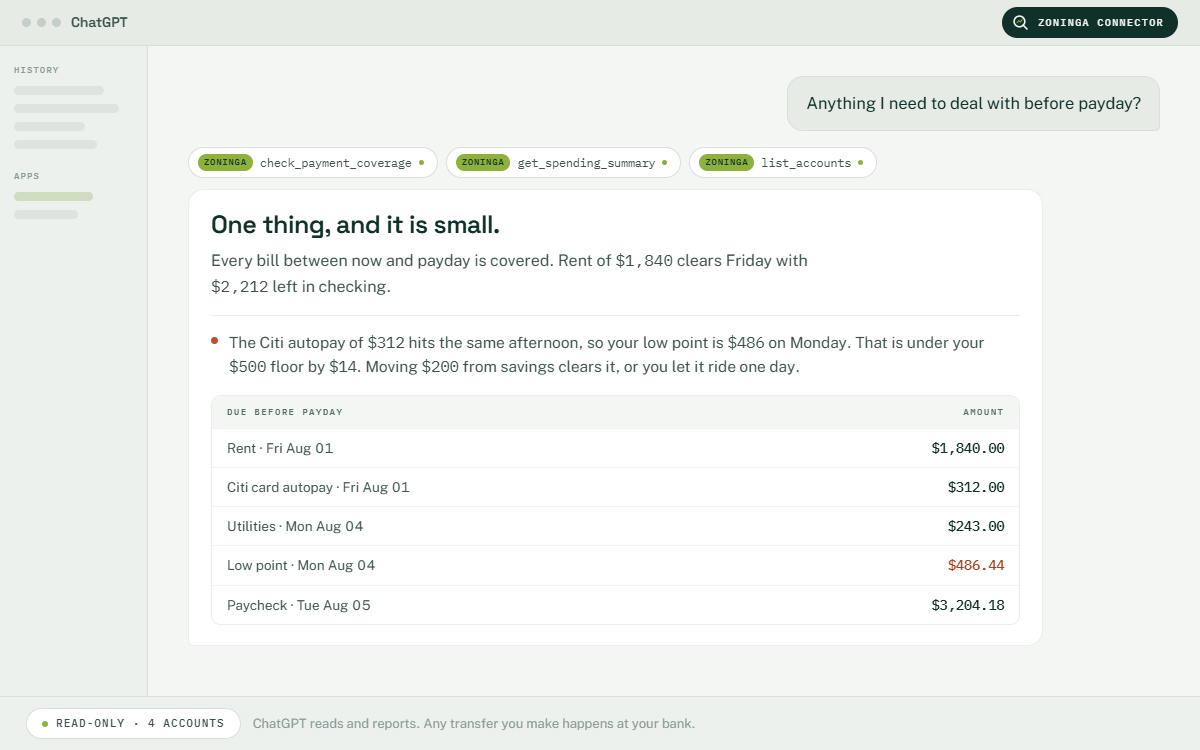
The 2-minute setup
- Get a Zoninga account (free). Sign up at zoninga.com. No credit card needed. Connect your bank via Plaid (read-only) or import a statement.
- Open ChatGPT's connector settings. In ChatGPT (Pro, Team, Enterprise, or Edu), go to Settings → Connectors and enable developer mode if prompted.
- Paste the Zoninga connection URL. Add a connector with the server URL https://zoninga.com/mcp and confirm.
- Approve the connection on Zoninga. You'll be asked to sign in and explicitly approve access (OAuth 2.1, so ChatGPT never sees your password, and your bank credentials never leave your bank).
- Ask your first question. Try: “Give me a financial health check based on my Zoninga data.”
Also works with Claude (any paid plan) and any MCP-compatible client with the same URL and steps. Claude guide here, or full instructions on our AI page →
Why this is safe (specifics, not vibes)
- No money movement, by design. Zoninga reads your bank data and can record bookkeeping when you ask, but it cannot move money. Neither can ChatGPT. You execute every transfer and every payment yourself, at your own bank.
- No bank passwords shared. Bank access runs through Plaid's read-only connection. The ChatGPT connection runs through OAuth 2.1. You approve it on Zoninga's site, and your password never passes through ChatGPT or Zoninga's AI tools.
- Purpose-built tools, not raw access. ChatGPT works through 170+ specific, scoped tools (“get spending summary,” “compare debt strategies”). There's no raw database access, so ChatGPT can only do what the tools allow.
- Revocable in one click. Disconnect any time from your Zoninga settings. Access stops instantly.
- Two-factor protected. Connecting requires 2FA on your Zoninga account.
ChatGPT watches your money. It never moves your money. Nobody does but you.
The full data-handling details are in our privacy policy.
How this compares to linking your bank to ChatGPT directly
OpenAI now lets ChatGPT Pro users link bank accounts directly. If that works for you, great. Reviewers and users raised two fair concerns: the AI gets broad access to raw transaction data, and there's no layer between the model and your accounts.
Zoninga takes a different approach: your data lives in your Zoninga account, and AI assistants (ChatGPT or Claude) reach it only through scoped tools you've approved. You get the same “AI that knows my finances” superpower, with a control layer in between. And it works with the assistant you already pay for, on either side of the fence.
| Feature | Direct bank link to an AI | Zoninga as the layer |
|---|---|---|
| Access type | Broad transaction access | 170+ scoped tools; writes only when you ask |
| Works with | One AI vendor | ChatGPT, Claude, any MCP client |
| Can AI move money? | No | No, and neither can Zoninga |
| Revoke access | Vendor settings | One click, instant |
| Extra layer | None | Daily agent monitoring, debt engine, budgets |
More than a connection: an agent that's already watching
The ChatGPT connection is one half of Zoninga. The other half is an agent that checks your money every day on its own for bills about to hit, balances running low, and spending drifting off plan. It proposes actions you approve with one tap. ChatGPT is your on-demand analyst; Zoninga's agent is the always-on watchdog.
FAQ
Can ChatGPT connect to my bank account?
Yes, through Zoninga. You connect Zoninga to your bank through Plaid (read-only), then connect ChatGPT to Zoninga through OAuth 2.1. ChatGPT reads balances, transactions, and rates through 170+ purpose-built tools. It cannot move a dollar, and you can revoke access in one click.
Do I need a paid ChatGPT plan?
Yes. Connectors are available on ChatGPT Pro, Team, Enterprise, and Edu plans. On the Zoninga side, AI connections are a Premium feature, included free in every new account's 14-day trial.
Can ChatGPT or Zoninga move my money?
No. Zoninga's bank access is read-only, and there are no tools (for ChatGPT, Claude, or Zoninga's own agent) that move money. You execute every transfer yourself at your bank.
Does ChatGPT see my bank password?
No. Your bank connection runs through Plaid; the ChatGPT connection runs through OAuth 2.1. You approve access on Zoninga's site. No credentials pass through ChatGPT.
What can ChatGPT actually do once connected?
Read and analyze: spending summaries, budgets, debt paydown plans across 9 strategies (including HELOC and ARM handling), cash-flow forecasts, net worth history, goals, and more (170+ tools in total).
Does this work with Claude too?
Yes. Use the same URL with any paid Claude plan, via Settings → Connectors. Step-by-step Claude guide here.
How do I disconnect?
One click in your Zoninga settings, any time. Access stops immediately.
Is my data sold or used to train AI models?
Sold, rented, or traded: never. Subscriptions are the business model, not ads, and we don't keep data beyond what giving you the best experience requires.
Used to improve Zoninga: yes, that's how the product gets better. When the assistant hits a request it can't handle yet, we log it and build that capability; feedback you give the assistant helps the same way. Your data is used to improve your experience and nothing else.
Your questions are processed by an inference provider (Anthropic) solely to generate your answers. Details are in our privacy policy. If you connect ChatGPT or Claude, your data goes to that provider under your own agreement with them, so check the training settings in your assistant's account.